
Methodology
To realise a visit safely and efficiently, you have to do the following steps:
Find the point of sale before you open a visit.
Before you start a vist a data sheet shows all important information such as channel, contact, comments, visit history, photo history, assortment, promotions…
Open a visit. For this step you can activate the distance control. It is an optional step which compares the position of the point of sale (saved on the map) with the position of the tablet or smartphone at the moment opening the visit. If the positions differ by more than a specified range, one of the options to open a distance visit or to request the remote opening appears.
“Thanks to the visit system of Market Control our work creates visibility at the points of sale.”
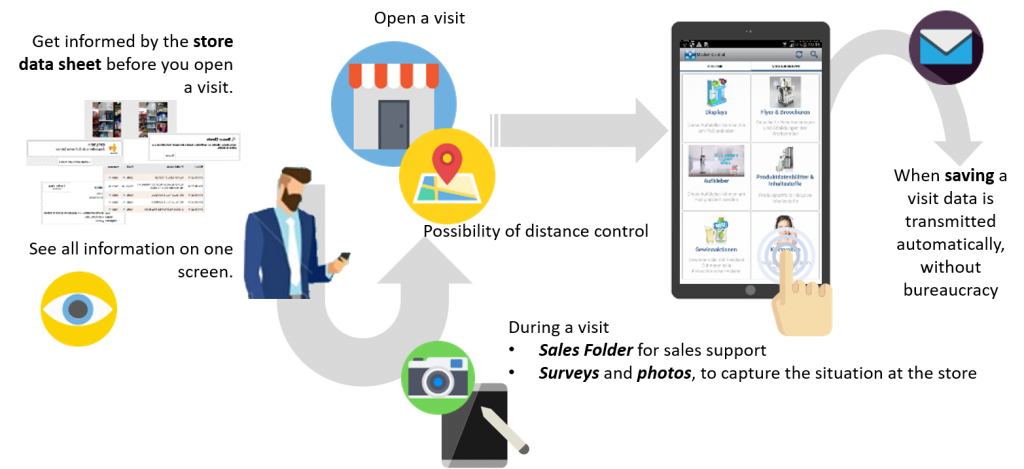
Within a visit there are two distinct parts:
- If you want to talk to a store or floor manager the Sales Folder is a powerful tool because it shows all product information, point of sale material, assortment, promotions …
- If you go directly to the shelf you can fill in the requested survey. Typical surveys of a normal visit are price requests, second positionings, competitor activities, photos of the shelf, status…
At the end of the visit you have to select Save visit to transmit the collected data.
“When leaving the store all data are stored and sent so that the risk of data loss is omitted”
This has two major advantages: On the one hand it comes to a reduction of bureaucracy and office work and therefore sales representatives have more time for visits. On the other hand the office staff gets a real time overview of the current point of sale situation.